


Flightsky: Flight Tracker 3D
4.7394.00 Reviews
App Specs
- Version
- 1.9
- Updated On
- License
- Free
- Downloads
- 1,000,000+
- Developer
- Ocean Float Mobile
- Categories
- Travel & Local
- Platform
- Android
Screenshots



 Analysis by AppCompare
Before installing any flight tracker, I ask one practical question: what do I need it to do at the moment I’m travelling? For a passenger, that may be checking whether a departure is still on schedule. For someone collecting a friend, it may be knowing when to leave home. Flightsky - Flight Tracker is aimed at those everyday decisions, with a travel app built around searching for trips and following flights. I’d treat it as a useful companion for checking information, rather than a replacement for an airline’s own instructions or airport announcements.
What to expect from a flight-tracking app
Flightsky is a free travel and local app from Ocean Float Mobile. It has over fifty thousand installs, is rated for everyone, and its current version is 1.2. The app is available for Android devices running version 6.0 or later. Its average rating is currently shown as zero, so there isn’t a meaningful user score to use as a shortcut when deciding whether it will suit you. I’d judge it by whether its flight search and tracking fit the way you travel.
The basic appeal is straightforward: find a trip, then use the app to follow the flight as your plans unfold. That can be more convenient than repeatedly navigating an airline site when you only need a quick status check. Still, I wouldn’t assume that a tracker’s information replaces the airline’s operational messages. If a gate, boarding procedure, or schedule changes, confirm important instructions with the airline or airport before acting on them.
Making the first search useful
On your first visit, start with one flight you already know, rather than trying to build a whole travel plan at once. Search using the details available on your itinerary, and check that the result matches the correct route and date before relying on it. This small verification step matters when flight numbers or routes look similar. If you’re searching for someone else’s trip, ask them for the exact flight details instead of guessing from the destination alone.
A good first success is finding the right flight and being able to return to its status when you need it. Try that at home before travel day, while you have time to correct a mistyped number or distinguish the right trip. I also recommend keeping your booking confirmation accessible; the tracker is most useful when you can compare what it shows with the itinerary you were given.
Where it can help in everyday travel
Imagine you’re picking up a family member after work. Rather than leaving at the originally planned arrival time, you can check the flight while you’re getting ready and make a more informed decision about when to head out. That can save an unnecessary wait at arrivals, especially if the journey is running behind. For a passenger connecting through a busy airport, a status check can also help you decide when to review your onward plans, although it cannot guarantee how much time you’ll have after landing.
A less obvious use is checking a flight before you set off for the airport. If the schedule has shifted, you may be able to avoid arriving far too early or making a rushed journey based on an outdated plan. I’d still leave a sensible buffer and follow the airline’s check-in and boarding guidance: a tracker is a prompt to reassess, not permission to cut it close.
Worth Reading Before You Choose

Flipboard Shows What News Apps Must Do Beyond the Feed

Switching to Android Auto Means Rethinking Your Driving Routine

Google Calendar Makes a Crowded Week Easier to Manage

Ludo King Makes the Most of the Minutes Between Plans

Baby Panda World Brings Quick Play to Modern Phones, but Its Game Library Feels Busy

ESPN’s Live Game View Makes Following Close Games Easier
Costs, expectations, and sensible limits
The app is free to download, with in-app purchases listed from six dollars and ninety-nine cents to thirty-nine dollars and ninety-nine cents per item. I’d begin with the free experience and only consider paying if a particular option clearly solves a need for you. Don’t treat an optional purchase as necessary just to check whether the app’s basic flight-search workflow suits your routine.
Flight information is most valuable when it is current, but any tracking app should be used with a little judgment. Network access, airport operations, and changes made close to departure can all affect what a traveller sees and how quickly it becomes useful. If the app and an airline notification disagree, use the airline’s direct instructions as the safer basis for decisions about check-in, boarding, or a rebooking. That is especially important when you have a tight connection or are travelling with someone who needs extra time.
Getting Started with Flightsky
Setting up Flightsky - Flight Tracker is a breeze. Once you download and open the app, you’re greeted with a clean, intuitive interface that’s as welcoming as a freshly brewed cup of coffee. You can easily search for your flight by entering your airline and flight number, or by using your flight’s route. It’s straightforward and doesn’t require a PhD in tech to navigate.
Features That Fly High
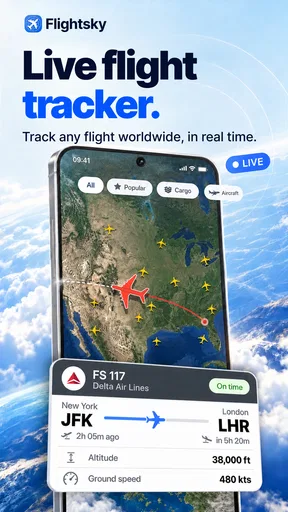
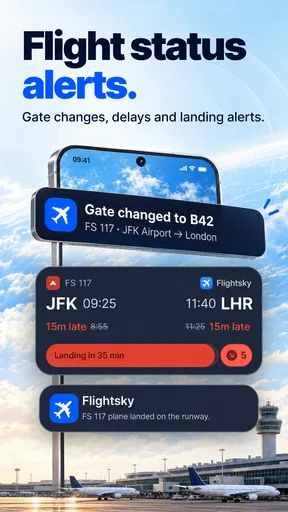
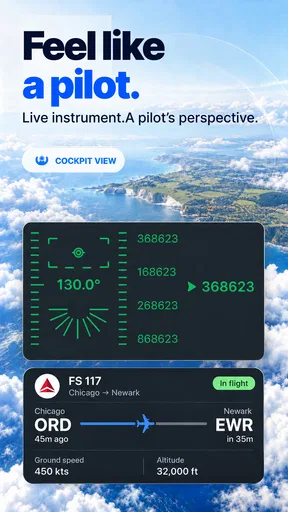
One of the standout features is the real-time flight status updates. We’re talking minute-by-minute updates on departures, arrivals, delays, and gate changes. It’s super handy, especially when you’re juggling a tight schedule. Plus, the app sends you notifications so you’re always in the loop, even if you’re busy grabbing a quick airport snack.
Another feature I love is the interactive map. It’s like a window seat view right from your phone. You can track your flight’s progress in real-time and see exactly where you are in the sky. It’s not only useful but also kind of mesmerizing to watch.
And if you’re someone who loves to plan ahead, the app’s weather forecasts for both departure and arrival locations are a lifesaver. It’s like knowing whether you’ll need an umbrella or a pair of sunglasses at your destination. Talk about handy!
User Experience and Interface
The user experience with Flightsky is smooth as silk. The interface is designed to be user-friendly and straightforward. Everything is where you expect it to be, and the learning curve is virtually non-existent. It’s one of those apps where you can just dive right in without feeling overwhelmed.
The design is sleek and modern, with a focus on functionality rather than flashy graphics. It’s easy on the eyes, which is great when you’re already stressed about travel plans. The color scheme is pleasing, making the app a joy to use even when you’re in a frantic hurry.
Choosing it over familiar alternatives
Compared with opening an airline’s app, a dedicated tracker can be a quicker place to look when you want to follow a flight without first finding the right booking screen. The airline remains the better source for booking changes, check-in steps, and instructions tied to your reservation. I see Flightsky as a handy second screen: use it to keep an eye on the journey, then turn to the airline when a decision affects what you must do next.
It also serves a different purpose from a general travel planner. A planner helps organise hotels, transport, and an itinerary; a flight tracker is more focused on the moving part of the trip. If you only fly occasionally and already get timely, clear updates from your airline, another app may add little. If you often coordinate airport pickups or monitor trips for family, having a separate place to check flight progress may feel worthwhile.
A few practical habits that make it more useful
For a departure, check the flight once before leaving and again when you reach the airport, rather than refreshing constantly. That gives you a useful comparison without letting a changing screen dominate the day. For arrivals, share the flight number with the person collecting you so both of you are following the same trip, and agree that the airline’s latest instructions take priority if plans shift.
When a route search brings up more than one plausible result, narrow it down with the airline and flight number from the itinerary instead of choosing the first match. For a trip with a connection, track each flight separately and pay attention to the onward flight’s own status; the arrival of the first plane does not by itself tell you whether the connection is protected or whether you have enough time. That distinction is easy to overlook when all you want is reassurance that the journey is moving.
I’d also think about battery and signal before depending on any phone-based tracker during a long travel day. Check the flight while you have a reliable connection, and keep your booking details available in whatever form is convenient to you. If your phone is low on power or the airport connection is unreliable, the airline’s desk and airport displays remain important fallbacks. A tracker is most helpful as one part of a simple plan, not the plan itself.
Who is likely to get the most from it
Flightsky makes the most sense for people who want a quick way to look up flights, including occasional travellers who prefer a focused screen over a larger airline app. It may be particularly handy for friends or relatives coordinating pickups, since they can follow the flight without needing access to the passenger’s booking. It can also suit frequent flyers who want a separate view of flight progress, provided they are comfortable checking official channels for decisions that require certainty.
I would skip it if you expect a tracker to manage your booking, resolve a missed connection, or tell you exactly what an airline will do after a disruption. Those are airline-support questions, not simply flight-status questions. It may also be unnecessary if your airline’s app already gives you everything you need and you do not track other people’s journeys. Keeping the number of travel apps small can be a benefit in itself when you are rushing between plans.
Why Flightsky Stands Out
What sets Flightsky - Flight Tracker apart from other flight tracking apps is its reliability and accuracy. In my experience, the updates were prompt and spot-on, which is crucial when you’re relying on the app for timely information. It’s like having a trusted friend who’s got your back during your travel adventures.
Moreover, the app doesn’t bombard you with ads, which is a huge relief. You can focus on what’s important: your flight details, without being distracted by annoying pop-ups. It’s a seamless experience from start to finish.
The Final Verdict
So, should you download Flightsky - Flight Tracker? Absolutely. Whether you’re a frequent flyer or someone who travels occasionally, this app is an indispensable tool for making your travels smoother and less stressful. It’s like having a little slice of calm in the chaotic world of air travel. Trust me, once you try it, you’ll wonder how you ever traveled without it.
With its user-friendly interface, real-time updates, and valuable features, Flightsky is a must-have for anyone who takes to the skies. So go ahead, give it a try, and let it guide you through your next journey. Safe travels!
Pros
- Real-time flight updates and alerts.
- User-friendly interface and navigation.
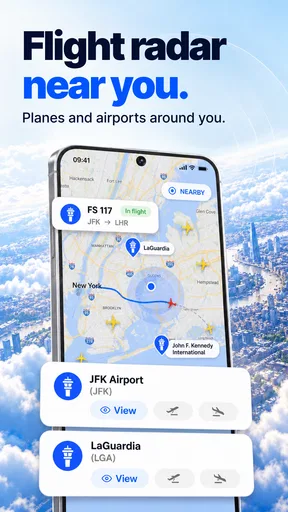
- Detailed airport information provided.
- Supports multiple languages for accessibility.
- Customizable notifications for flights.
Cons
- In-app purchases for premium features.
- Limited offline functionality.
- Occasional ads can interrupt usage.
- Requires an internet connection for updates.
- Some features locked behind paywall.
FAQs for Flightsky: Flight Tracker 3D
What features does Flightsky - Flight Tracker offer?
Flightsky - Flight Tracker provides real-time flight tracking, detailed airport information, and live weather updates. Users can set alerts for flight status changes, view terminal maps, and access historical flight data. The app is designed for frequent travelers, offering a comprehensive suite of tools to enhance the travel experience.
Is Flightsky - Flight Tracker available offline?
Flightsky - Flight Tracker requires an internet connection to provide real-time updates and accurate flight information. However, you can download specific flight details for offline viewing, ensuring you have access to critical information even without connectivity. This feature is particularly useful when traveling through areas with limited internet access.
How accurate is the flight tracking data in Flightsky?
Flightsky - Flight Tracker uses reliable data sources and advanced algorithms to deliver highly accurate flight tracking. The app continuously updates flight status, including delays and cancellations, to ensure users receive the most current information. However, minor discrepancies can occur due to external factors like carrier updates or network issues.
Does Flightsky - Flight Tracker include international flights?
Yes, Flightsky - Flight Tracker covers both domestic and international flights. It provides global coverage, allowing users to track flights from various airlines worldwide. Whether you're traveling locally or internationally, the app offers comprehensive tracking services to keep you informed throughout your journey.
Are there any subscription fees for Flightsky - Flight Tracker?
Flightsky - Flight Tracker offers a free version with essential features, but to access premium functionalities like ad-free usage, additional alerts, and in-depth analytics, a subscription is required. Users can choose from monthly or annual plans, providing flexibility based on their travel needs and frequency.


